What it does
1.0FilterMore in detail.
- 01
Model categories with their instance count.
- 02
Scope: current selection, visible in the view, in the view or the whole model; only 3D elements or only annotations.
- 03
Expands the selection by category, family, type, hosted, nested or components.
- 04
Final filter by type: keep only the matches or remove them.
- 05
Selection memory: save a selection, add elements to it or take them away, and restore it later.
How it works
2.0FilterMore in four steps.
- 01
Choose the starting set under Select.
- 02
Tick the categories you want in the list; optionally extend the selection with Expand Selection.
- 03
If needed, filter by a specific type and choose Keep Only or Remove.
- 04
Press Filter More.
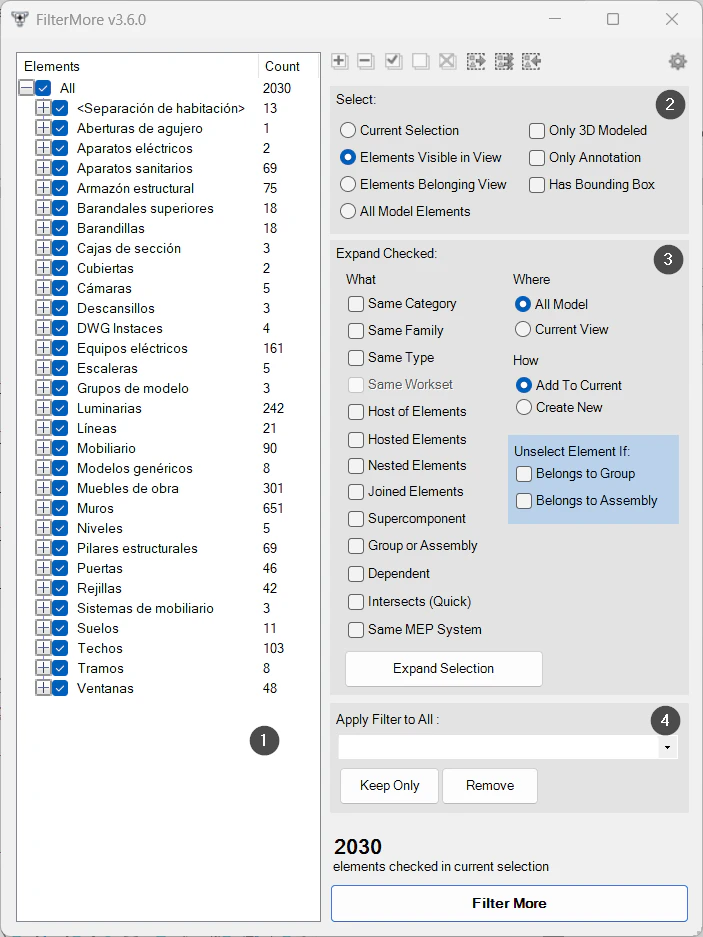
On screen
The FilterMore window.
- 1Model categories with their instance count.
- 2Starting set and filters (only 3D, only annotations).
- 3Selection expansion: what, where and how.
- 4Final filter by type: Keep Only or Remove.
Screenshot from the user guide, which comes with the licence.
A use case
In a large model, keep every light fitting visible in the view except those of one type, and save that selection to recall it later.
More tools
3.0More productivity tools from the same group.
- LevelAutoSetAssigns the nearest reference level to the selected elements by proximity, keeping their position in space. Works with walls, floors, building services and families.
- PreFilterLets you preselect the categories to filter before making the selection. Part of FilterMore.
- SelectionExpanderExpands the current selection in several ways: by type, category, host or relationships. Part of FilterMore.
- FilterByParameterFilters elements based on specific parameter values. Part of FilterMore.
- FilterByWarningsSorts the model's warnings by type and category and selects the elements involved. Part of FilterMore.
Want it for your team?