What it does
1.0FilterByWarnings in detail.
- 01
Warnings grouped by error type and by affected category.
- 02
Choose which groups to review.
- 03
Scope: current selection, active view, the whole model or only 3D elements.
- 04
Saved selection sets.
How it works
2.0FilterByWarnings in three steps.
- 01
Tick the warning types you want to review.
- 02
Choose the scope: selection, view, model or only 3D elements.
- 03
Press Filter By Warning: the elements involved are selected so you can fix them.
On screen
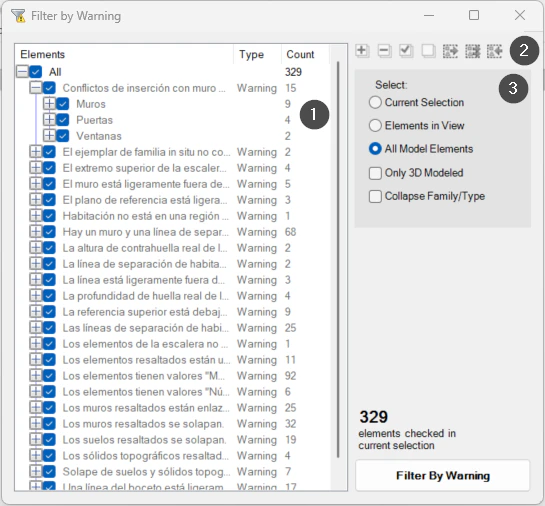
The Filter by Warnings window.
- 1Warnings grouped by type and category.
- 2Tick all or none, expand and saved selections.
- 3Scope of the analysis.
Screenshot from the user guide, which comes with the licence.
A use case
Before an issue, select in one go every element with the same type of warning in the active view to fix them.
More tools
3.0More productivity tools from the same group.
- FilterMoreAdvanced filter with extended capabilities and selection memory. Refines complex selections in large-scale projects.
- LevelAutoSetAssigns the nearest reference level to the selected elements by proximity, keeping their position in space. Works with walls, floors, building services and families.
- PreFilterLets you preselect the categories to filter before making the selection. Part of FilterMore.
- SelectionExpanderExpands the current selection in several ways: by type, category, host or relationships. Part of FilterMore.
- FilterByParameterFilters elements based on specific parameter values. Part of FilterMore.
Want it for your team?