What it does
1.0SelectionExpander in detail.
- 01
Combinable criteria: same category, family, type or workset; host, hosted, nested, joined, supercomponent, group or assembly, dependants, intersections and same MEP system.
- 02
Scope: the whole model or only the current view.
- 03
Adds what it finds to the current selection or starts a new one.
- 04
Leaves out elements that belong to groups or assemblies.
How it works
2.0SelectionExpander in four steps.
- 01
Select one or more starting elements.
- 02
Tick the criteria (same family, hosted, same MEP system…).
- 03
Choose the scope and whether to add to the current selection.
- 04
Press Expand Selection.
On screen
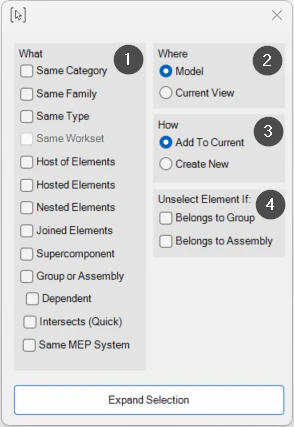
The Selection Expander window.
- 1What: criteria used to extend the selection.
- 2Where: the whole model or the current view.
- 3How: add to the selection or start a new one.
- 4Leave out elements in groups or assemblies.
Screenshot from the user guide, which comes with the licence.
A use case
From one duct run, select its whole MEP system in the current view to review or isolate it.
More tools
3.0More productivity tools from the same group.
- FilterMoreAdvanced filter with extended capabilities and selection memory. Refines complex selections in large-scale projects.
- LevelAutoSetAssigns the nearest reference level to the selected elements by proximity, keeping their position in space. Works with walls, floors, building services and families.
- PreFilterLets you preselect the categories to filter before making the selection. Part of FilterMore.
- FilterByParameterFilters elements based on specific parameter values. Part of FilterMore.
- FilterByWarningsSorts the model's warnings by type and category and selects the elements involved. Part of FilterMore.
Want it for your team?