What it does
1.0TypeManager in detail.
- 01
Type tree by category or by assembly code, with the number of instances.
- 02
Units, lengths, areas, volumes, unit and total price, type mark, keynote and assembly code.
- 03
Projected areas of doors and windows.
- 04
Elements in the view, in links or in the whole model, grouped by model.
- 05
Export by types or by instances to Excel, CSV, BC3 or the clipboard.
How it works
2.0TypeManager in four steps.
- 01
Tick the types in the tree.
- 02
Choose which elements are analysed (view, links, model).
- 03
Under Quantities, compute projected areas if you need them.
- 04
Under Export, choose the format and press Types (totals per type) or Instances (each instance).
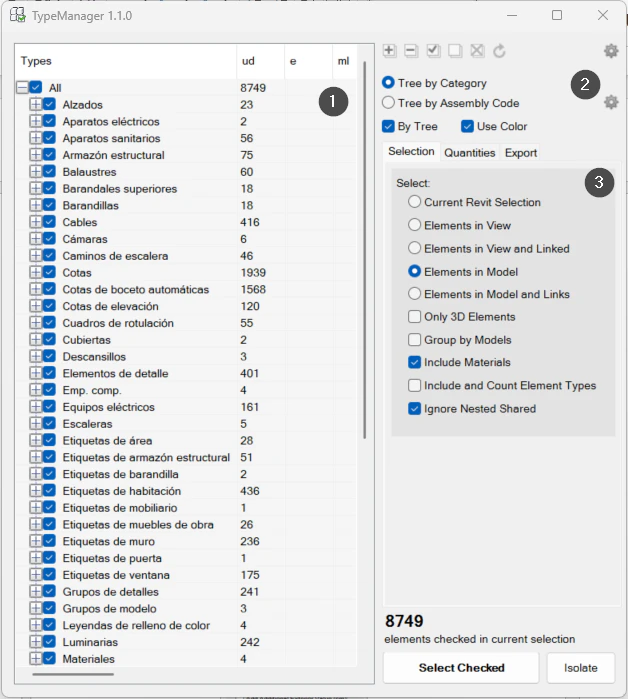
On screen
The TypeManager window.
- 1Type tree with its quantities.
- 2Organisation: by category or by assembly code.
- 3Elements analysed.
Screenshot from the user guide, which comes with the licence.
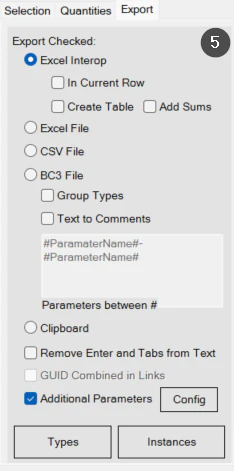
A use case
Take off quantities by type from the model and its links and export them to BC3 for the cost estimate.
More tools
3.0More management tools from the same group.
- TransferSingleAdvanced transfer of content and standards from one file to another (or to several). Ideal for moving types, views and settings between projects.
- ElementRenumberingRenumbers different types of elements by selecting them one by one. Ideal for reorganising codes after project changes.
- MassLoadFamiliesLoads loadable families in bulk from a folder. Part of TransferSingle.
- MassSaveFamiliesSaves the project's loadable families in bulk to a folder or subfolders. Part of TransferSingle.
- ZoneItAssigns zone and level to elements according to their location in rooms, scope boxes or masses and their properties.
- LocateItAssigns the level to elements based on their position. Part of ZoneIt.
Want it for your team?