What it does
1.0MassLoadFamilies in detail.
- 01
Folder and family browser, including subfolders.
- 02
Always load, load only new ones or only existing ones.
- 03
Overwrite or keep the model's parameters.
- 04
Error log.
How it works
2.0MassLoadFamilies in four steps.
- 01
Choose the source folder, with its subfolders if needed.
- 02
Tick the families to load.
- 03
Choose whether to load all, only new or only existing ones, and what happens to parameters.
- 04
Press Load Families.
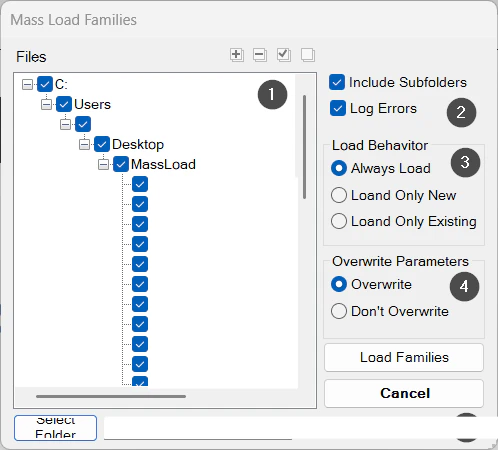
On screen
The Mass Load Families window.
- 1Folders and families to load.
- 2Include subfolders and log errors.
- 3Load behaviour.
- 4Overwrite or keep parameters.
- 5Source folder.
Screenshot from the user guide, which comes with the licence.
A use case
Update every furniture family in a project from the company library in a single operation.
More tools
3.0More management tools from the same group.
- TransferSingleAdvanced transfer of content and standards from one file to another (or to several). Ideal for moving types, views and settings between projects.
- TypeManagerManages every type in the model with fast handling of their properties. Supports quantities, costs and export to multiple formats.
- ElementRenumberingRenumbers different types of elements by selecting them one by one. Ideal for reorganising codes after project changes.
- MassSaveFamiliesSaves the project's loadable families in bulk to a folder or subfolders. Part of TransferSingle.
- ZoneItAssigns zone and level to elements according to their location in rooms, scope boxes or masses and their properties.
- LocateItAssigns the level to elements based on their position. Part of ZoneIt.
Want it for your team?