What it does
1.0MassSaveFamilies in detail.
- 01
Project families organised by category.
- 02
Subfolders by category and the category in the file name.
- 03
3D view as each family's default view.
- 04
Overwrite or skip files that already exist.
How it works
2.0MassSaveFamilies in three steps.
- 01
Tick the families to save.
- 02
Choose the target folder and the save options.
- 03
Press Save Families.
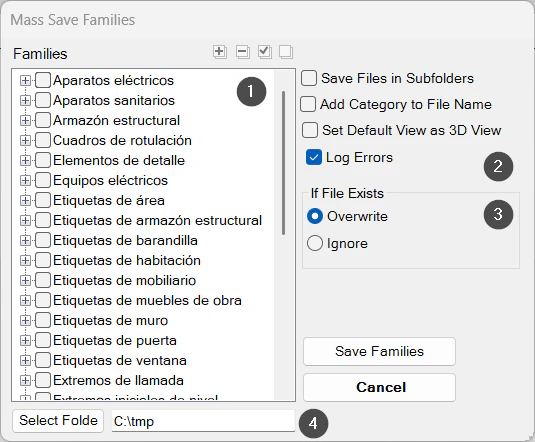
On screen
The Mass Save Families window.
- 1Project families by category.
- 2Subfolders, category in the name, default 3D view and error log.
- 3If the file already exists: overwrite or skip.
- 4Target folder.
Screenshot from the user guide, which comes with the licence.
A use case
Extract every family from a finished project to reuse it in another one or add it to the library.
More tools
3.0More management tools from the same group.
- TransferSingleAdvanced transfer of content and standards from one file to another (or to several). Ideal for moving types, views and settings between projects.
- TypeManagerManages every type in the model with fast handling of their properties. Supports quantities, costs and export to multiple formats.
- ElementRenumberingRenumbers different types of elements by selecting them one by one. Ideal for reorganising codes after project changes.
- MassLoadFamiliesLoads loadable families in bulk from a folder. Part of TransferSingle.
- ZoneItAssigns zone and level to elements according to their location in rooms, scope boxes or masses and their properties.
- LocateItAssigns the level to elements based on their position. Part of ZoneIt.
Want it for your team?