What it does
1.0SheetComposer in detail.
- 01
Drawing area split into configurable regions.
- 02
Anchor point of the region and insertion point of the view.
- 03
Sheet size from the title block or custom, with margins.
- 04
Fine offsets in X and Y.
- 05
The code is stored in a parameter of each view and other tools use it to place the view.
How it works
2.0SheetComposer in four steps.
- 01
Create a shared parameter called sheetComposer in the views.
- 02
Choose the region, the reference point and the insertion point.
- 03
Set the format, margins and divisions.
- 04
Press Set Value: the code is stored in the view and views place themselves on the sheet.
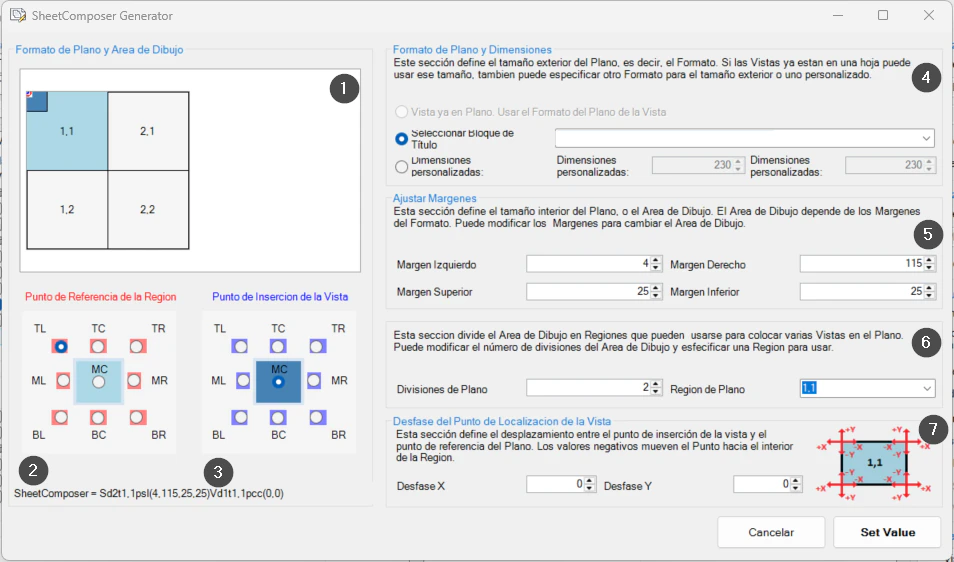
On screen
The SheetComposer window.
- 1Regions of the drawing area.
- 2Reference point of the region.
- 3Insertion point of the view.
- 4Sheet format and dimensions.
- 5Margins.
- 6Divisions of the drawing area.
- 7Insertion point offset.
Screenshot from the user guide, which comes with the licence.
A use case
Lay out a series of detail sheets so that, if a view or the sheet changes size, you only need to run the tool again.
More tools
3.0More views tools from the same group.
- ZoomToElementQuickly zooms to an element or set of elements in any view. Part of WBTools.
- ViewCreatorCreates sheets and views from levels and scope boxes with a single command.
- SheetCreatorCreates sheets in bulk from a tree structure or an Excel table. Part of ViewCreator.
- ViewCropperCrops views quickly by copying or assigning CropRegion and SectionBox.
- ViewManagerManages multiple sheets and views with additional commands: duplicate by level, assign revisions and grid spacing.
Want it for your team?