What it does
1.0ViewCreator in detail.
- 01
Views by level and by scope box, dependent views included.
- 02
Type, phase, scale, style, template and sheet of each view, editable or loaded from Excel.
- 03
Names and titles built from parameters between hash signs.
- 04
Level and scope box filters by name or regular expression.
- 05
If the sheet already exists: update it, rename it or skip it.
How it works
2.0ViewCreator in four steps.
- 01
Tick the levels and, if you want, the scope boxes.
- 02
Set how names and titles are built.
- 03
Set what to do if they already exist and the position on the sheet.
- 04
Press Create Views and Create Sheets.
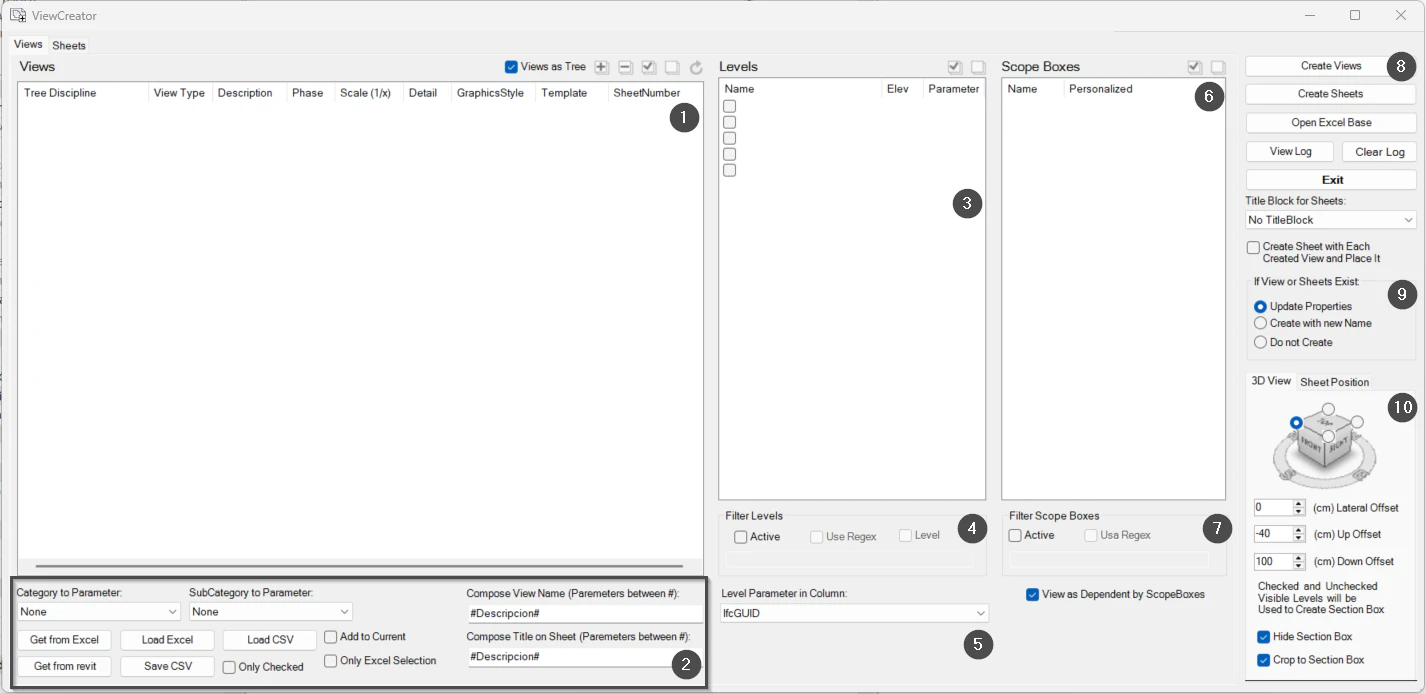
On screen
The ViewCreator window.
- 1Views to be created.
- 2Names and titles with parameters; load from Excel or CSV.
- 3Levels.
- 4Level filter.
- 5Guide parameter.
- 6Scope boxes.
- 7Scope box filter.
- 8Main actions.
- 9If the view or sheet already exists.
- 103D views and position on the sheet.
Screenshot from the user guide, which comes with the licence.
A use case
Generate the plans of every level for each scope box, with their template and sheet, in a single step.
More tools
3.0More views tools from the same group.
- ZoomToElementQuickly zooms to an element or set of elements in any view. Part of WBTools.
- SheetComposerMacro language for placing views, schedules or details precisely on a sheet.
- SheetCreatorCreates sheets in bulk from a tree structure or an Excel table. Part of ViewCreator.
- ViewCropperCrops views quickly by copying or assigning CropRegion and SectionBox.
- ViewManagerManages multiple sheets and views with additional commands: duplicate by level, assign revisions and grid spacing.
Want it for your team?