What it does
1.0ViewManager in detail.
- 01
View and sheet trees with filters (on sheets, not placed, by type) and search.
- 02
Duplicates views as dependent or on another level, and sheets with their views.
- 03
Creates sheets and places views by dragging them or by matching values.
- 04
Copies annotations, crops views, edits grids and exports.
- 05
List to Excel and automatic sheet layout with SheetComposer.
How it works
2.0ViewManager in three steps.
- 01
Filter the views or sheets you want to see.
- 02
Select several in the tree.
- 03
Right-click and choose the operation: duplicate, create sheets, place views, copy annotations, crop, grids or export.
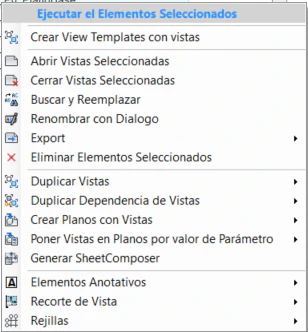
On screen
Operations on the selected views.
Screenshot from the user guide, which comes with the licence.
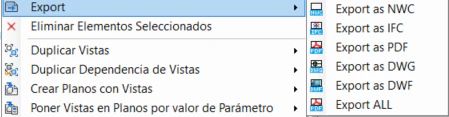
A use case
Duplicate the sheets of a typical floor for every other level, with their views already placed.
More tools
3.0More views tools from the same group.
- ZoomToElementQuickly zooms to an element or set of elements in any view. Part of WBTools.
- SheetComposerMacro language for placing views, schedules or details precisely on a sheet.
- ViewCreatorCreates sheets and views from levels and scope boxes with a single command.
- SheetCreatorCreates sheets in bulk from a tree structure or an Excel table. Part of ViewCreator.
- ViewCropperCrops views quickly by copying or assigning CropRegion and SectionBox.
Want it for your team?