What it does
1.0RoomToParameter in detail.
- 01
Spatial criteria: Revit's room fields, geometric centre, outline, intersection or touch.
- 02
Expandable detection box for elements on the boundary.
- 03
Text: name, number, both or a specific parameter, with a separator.
- 04
Rooms in linked models.
- 05
Selection at the end (modified or not modified) and a report.
How it works
2.0RoomToParameter in four steps.
- 01
Choose Elements in View (or the selection).
- 02
Enter the target parameter, Comments for example.
- 03
Tick In Room, Geometric Center of Element and Intersects.
- 04
Choose Only Room Name and press Run.
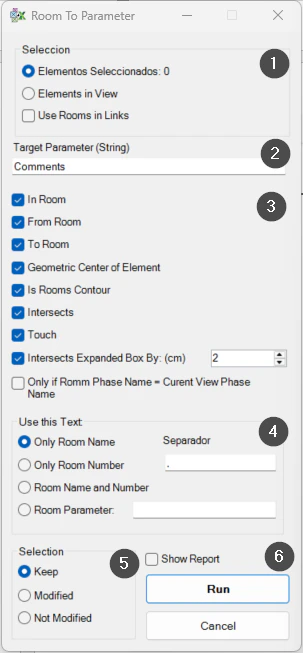
On screen
The Room To Parameter window.
- 1Selection and rooms in links.
- 2Target parameter.
- 3Spatial rules.
- 4Text copied and separator.
- 5Selection at the end.
- 6Report and the Run button.
Screenshot from the user guide, which comes with the licence.
A use case
Record the room name in the Comments of all the furniture in a view, to tag it or filter it by location.
More tools
3.0More data tools from the same group.
- ParameterJoinConcatenates parameters and free text within the selected elements. Part of WBTools.
- ParameterSetValueAssigns the value of a specific parameter to the active selection. Part of WBTools.
- SyncScheduleExports schedules to Excel, keeping each parameter exactly as displayed in the Excel document. Part of WBTools.
- CopyFromHostCopies the value of a parameter from the host to the hosted element. Part of WBTools.
- ExcelSyncSyncs properties Excel ↔ Revit in a fast, configurable two-way process.
Want it for your team?