What it does
1.0CopyFromHost in detail.
- 01
Source parameter on the host and target parameter on the hosted element.
- 02
For the selection of hosted elements.
How it works
2.0CopyFromHost in three steps.
- 01
Select the hosted elements.
- 02
Enter the host parameter and the target parameter.
- 03
Press Copy from Host.
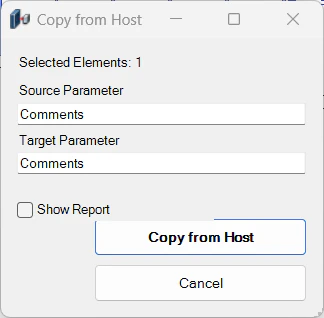
On screen
The Copy from Host window.
Screenshot from the user guide, which comes with the licence.
A use case
Pass the code of the wall each window sits in on to the window.
More tools
3.0More data tools from the same group.
- ParameterJoinConcatenates parameters and free text within the selected elements. Part of WBTools.
- ParameterSetValueAssigns the value of a specific parameter to the active selection. Part of WBTools.
- RoomToParameterCopies the name, number or another parameter of a room to the elements it contains. Part of WBTools.
- SyncScheduleExports schedules to Excel, keeping each parameter exactly as displayed in the Excel document. Part of WBTools.
- ExcelSyncSyncs properties Excel ↔ Revit in a fast, configurable two-way process.
Want it for your team?