What it does
1.0LokationKeeper in detail.
- 01
X, Y and Z coordinates and rotation, relative to the element or absolute.
- 02
Reference point: insertion, family origin, centre of the box or lowest point.
- 03
Matching between model versions by GUID or by a parameter.
- 04
Save, restore, apply to new elements and copy positions from one group to another (Pair Wise).
- 05
Additional offsets in centimetres.
How it works
2.0LokationKeeper in three steps.
- 01
Save the elements' position with LS.
- 02
Make the changes (swapping families, for example).
- 03
Restore the position with RP, or apply it to others with AP or PW.
On screen
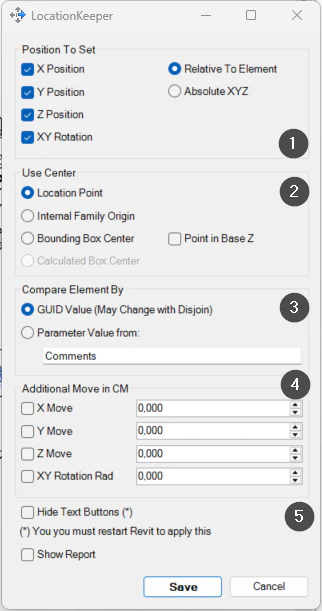
The LocationKeeper settings.
- 1Coordinates saved or applied.
- 2Reference point of the element.
- 3How the element is identified: GUID or parameter.
- 4Additional offsets.
- 5Options.
Screenshot from the user guide, which comes with the licence.
A use case
Swap families for a new version and put them back in exactly the position and rotation they had.
More tools
3.0More modelling tools from the same group.
- PushItMoves elements up to the nearest obstacle in a 3D view. Speeds up the manual adjustment of building services and construction elements.
- JoinMultipleJoins multiple elements across categories at once, assigning a priority value to each selected category.
- MatchRotationAligns the Z rotation of almost any Revit element. The perfect complement to the native Align command.
- MoveToPointMoves elements precisely to a selected position. Part of PushIt.
- WallRotationWrites a wall's angle relative to true north or project north into a parameter. Part of WBTools.
- WallRoomFinishCreates walls, floors and ceilings from rooms, with options to match room parameters to family types.
- FloorProjectionProjects floors or roofs onto any element, with options to generate floors from family elements.
- DoorFitWallsWorks out the distance from each door to the nearest finish walls and stores it in parameters of the door.
- PadFromElementsGenerates pads for multiple instances of families placed in the project.
- ScatterLocationRandomly moves and rotates elements within set ranges to make repeated elements look natural.
Want it for your team?