What it does
1.0BatchSimple in detail.
- 01
Relink models from a list, with full or relative paths and replacements in the names.
- 02
Export views to NWC or IFC and sheets to DWG, DWF or PDF.
- 03
Models in a folder or from a list.
- 04
Opening with audit, worksets or detached from central; save or discard changes.
- 05
Destination: next to the model, in folders by extension or in a given path.
How it works
2.0BatchSimple in four steps.
- 01
Choose the folder or list of models.
- 02
Tick the tasks (relink, NWC, IFC, PDF, DWG, DWF) and set their options.
- 03
Set opening, saving and destination.
- 04
Press Run Batch.
On screen
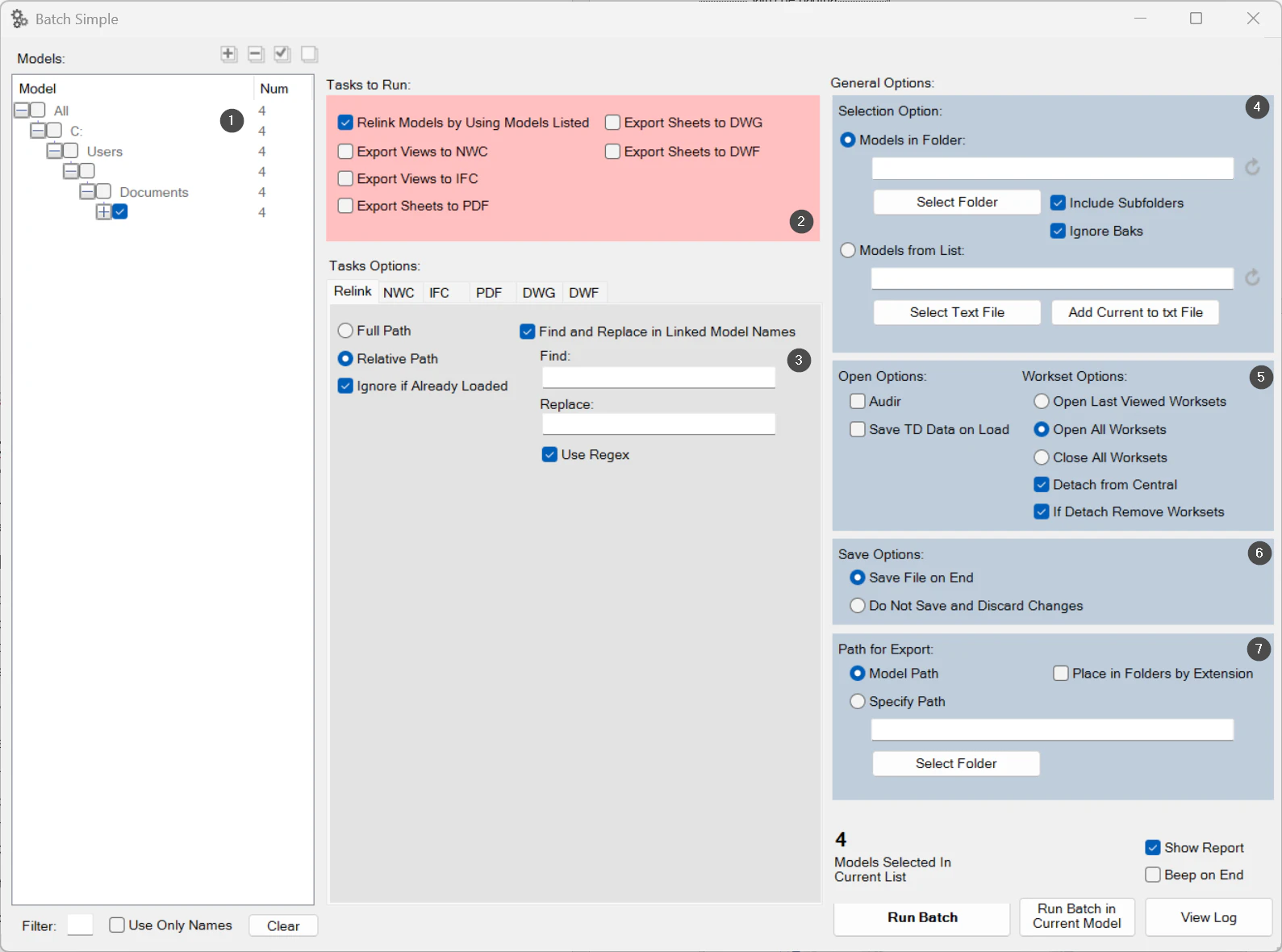
The Batch Simple window.
- 1Models found.
- 2Tasks to run.
- 3Options of the chosen task.
- 4Source: folder or list.
- 5Opening and worksets.
- 6Saving.
- 7Export destination.
Screenshot from the user guide, which comes with the licence.
A use case
Export every model in an issue to IFC and PDF with the same settings, without opening them.
Want it for your team?