What it does
1.0BatchMF in detail.
- 01
Models or families in a folder (with subfolders) or from a list, or the open model.
- 02
Tasks with one command per line, loaded from a file or added from a menu.
- 03
Export to NWC, IFC, FBX, PDF and DWG, and of model data to CSV.
- 04
Shared and family parameters: create, replace, copy values and set formulas.
- 05
Purges, bulk renaming, Revit and CAD links, worksets, macros and Dynamo scripts.
- 06
Opening with audit, worksets or detached from central; saving and a report.
How it works
2.0BatchMF in four steps.
- 01
Choose the folder of models or families.
- 02
Write the task's commands or load them from a file (also with right-click, from the menu).
- 03
Set the opening and saving options.
- 04
Press Run Current Task: they are all processed without opening them on screen.
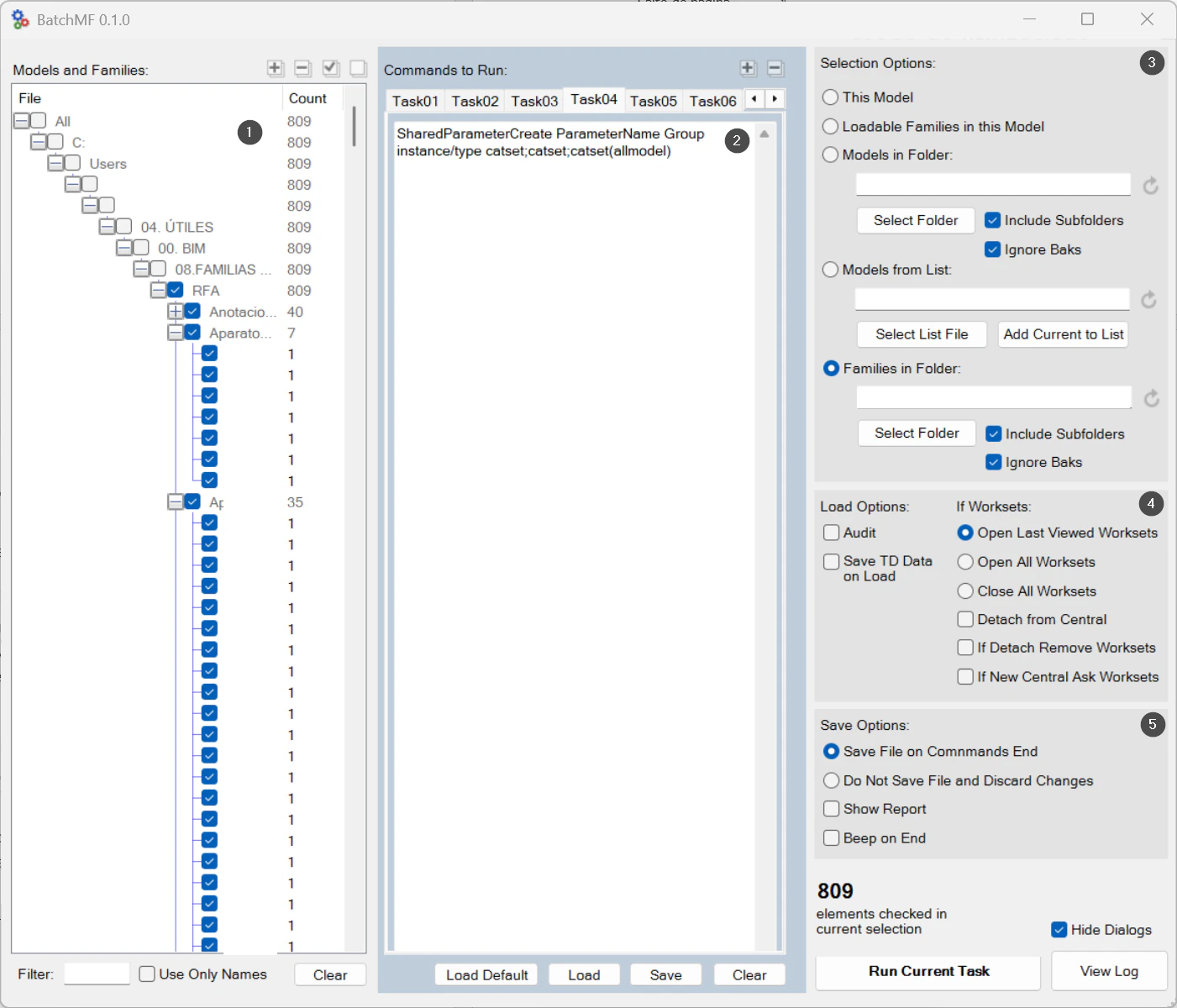
On screen
The BatchMF window.
- 1Models and families found.
- 2Tasks, with one command per line.
- 3Source: this model, folders or a list.
- 4Opening and worksets.
- 5Saving and report.
Screenshot from the user guide, which comes with the licence.
A use case
Add a shared parameter to the company's entire family library and save the families, in a single run.
More tools
3.0More automation tools from the same group.
Want it for your team?