What it does
1.0WorksetCreator in detail.
- 01
Existing and new worksets, in two lists.
- 02
Repeated names: skip them or create them with a suffix.
- 03
Paste from Excel, load from a file, type them in or copy the existing ones.
- 04
Filters to activate certain worksets or make them mandatory.
How it works
2.0WorksetCreator in three steps.
- 01
Copy the workset list from Excel.
- 02
Press Paste from Clipboard.
- 03
Press Create Worksets.
On screen
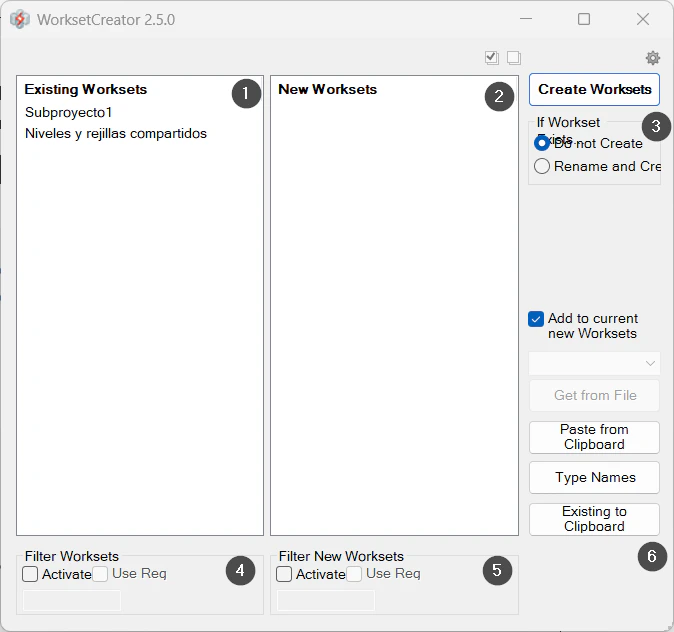
The WorksetCreator window.
- 1Existing worksets.
- 2New worksets.
- 3Repeated names: skip them or add a suffix.
- 4Filter for existing ones.
- 5Filter for new ones.
- 6Input: paste, load from a file, type or copy the existing ones.
Screenshot from the user guide, which comes with the licence.
A use case
Set up a new model by copying the company's workset list from Excel and creating them all at once.
More tools
3.0More collaboration tools from the same group.
Want it for your team?