What it does
1.0WorksetByAverage in detail.
- 01
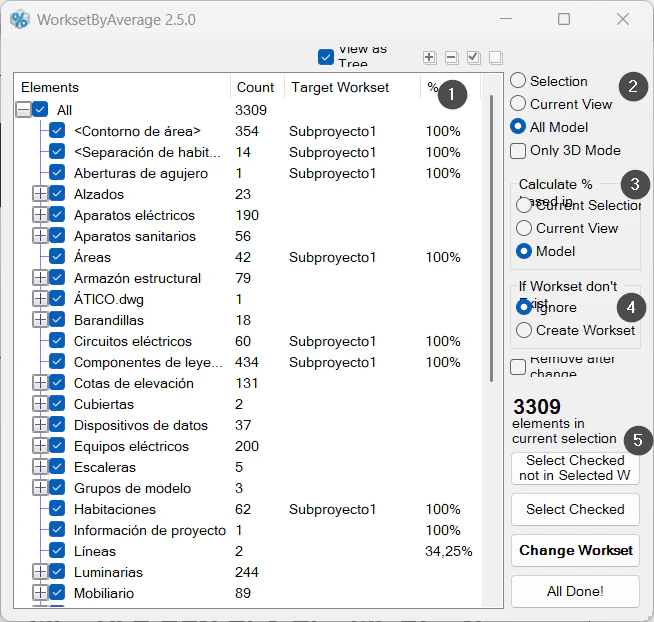
Per category: number of elements, prevailing workset and percentage.
- 02
Scope of the analysis and how the percentage is calculated.
- 03
If the workset does not exist, creates it or skips it.
- 04
Selects the ticked elements and changes their workset.
How it works
2.0WorksetByAverage in three steps.
- 01
Choose the scope (Model, for example).
- 02
Review the categories below 100% and adjust their workset if needed.
- 03
Press Change Workset to move each category to its workset.
On screen
The WorksetByAverage window.
- 1Per category: elements, prevailing workset and percentage.
- 2Scope of the analysis.
- 3Basis for the percentage.
- 4If the workset does not exist: skip or create it.
- 5Actions.
Screenshot from the user guide, which comes with the licence.
A use case
Tidy a model that brings together elements from several sources: review the categories below 100% and move them to their workset.
More tools
3.0More collaboration tools from the same group.
Want it for your team?